Lesson 5 of 19 · ~5 min
Work the Threats log
You'll learn: How to open the shared Threats drawer, read the persistent medium-and-above rollup, switch scope and severity, and drill into the source items behind any threat.
Open an event that has run at least one scan — the log only fills as scans complete.
01 Open the Threats drawer
The Threats log is a right-side slide-over drawer, not its own page. The same drawer is mounted on three surfaces, each with a Threats button:
- The brief (
scan.html) — the button sits in the brief's action row alongside Live, View on map, and Export PDF. - The event page (
event.html). - The live monitor (
live.html) — the Threats button in the alert bar.
Click the button to slide the drawer in. Press Esc, click the close (×) control, or click the dimmed backdrop to dismiss it.
02 Read the count badge and the severity tiles
Before you even open it, the Threats button carries a colored count badge — the total of all medium, high, and critical threats in scope, tinted to the highest severity present (red for critical, orange for high, amber for medium). On the live monitor the badge re-checks every 60 seconds, and it refreshes after a scan completes.
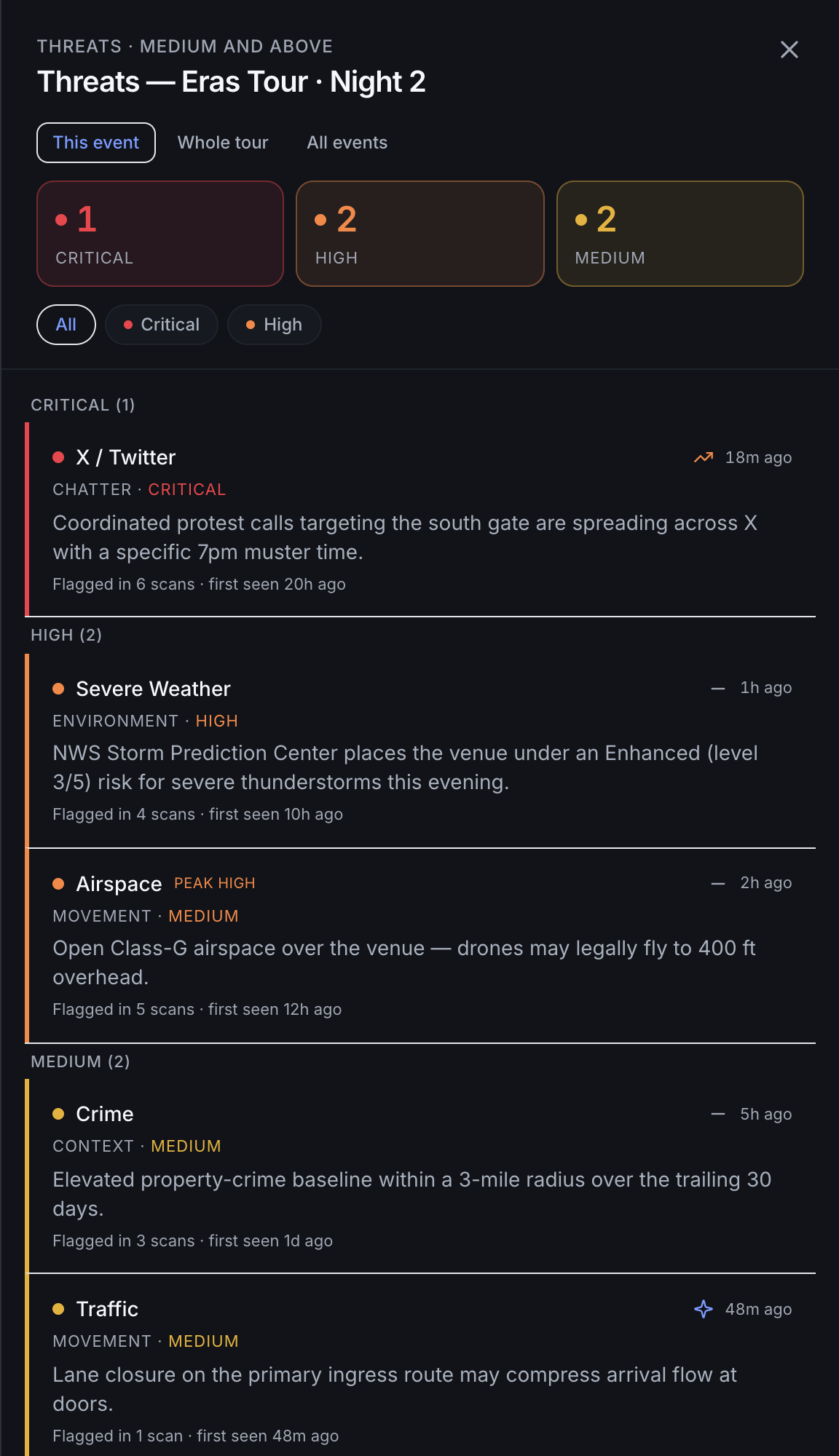
Inside the drawer header, under the Threats · medium and above label, three tiles break the rollup down: Critical, High, and Medium. A tile lights up in its severity color when it has a non-zero count and stays muted at zero. The counts come from GET /api/threats in the counts object.
03 Switch scope and filter by severity
When more than one scope applies, a scope toggle appears at the top of the drawer. The brief and event surfaces pass both the event and org, so you can switch between This event and All events; on a tour stop you may also see Whole tour, which rolls up every stop. Org scope walks your organization's subtree, so you only see threats you can access.
Below that, severity pills let you narrow the list: All (medium and up), Critical, and High. Each pill re-queries /api/threats with the matching minSeverity; All sends the default medium. Low and clear signals never enter the log.
04 Read a threat row
Rows are grouped under critical, high, and medium headers (each with its own count) and ordered by severity. Each row is one signal, deduplicated across every scan, sourced from the persistent threat_flags rollup. A row shows you:
- The signal's human label (for example X / Twitter, Severe Weather, Airspace) and its category (Chatter, Environment, Movement, Context).
- The current severity, plus a peak tag when the signal once ran hotter than it does now.
- A trend cue — escalating, de-escalating, steady, or new — derived from the previous-to-last severity transition, and a relative timestamp for when it was last seen.
- The latest headline, and a line reading Flagged in N scans · first seen … so you can gauge persistence.
05 Drill into the source items behind a threat
Click any row to expand it. The drawer calls GET /api/threats/timeline for that event and signal and pulls the per-scan occurrence history, including the underlying payload — the actual tweets, posts, or other items behind the threat.
- Each occurrence shows its severity and the source items, with the author and item severity where available, plus an outbound link (↗) to the original item.
- Every occurrence carries an open brief → link that jumps to
/reportfor that scan. - If no source detail was retained, the row points you to the brief for full signal detail.
Tips
- An empty log is good news — the No medium+ threats state means signals have stayed at low or clear. Medium and above collect here automatically as scans run.
- The peak tag is your re-check cue: a signal showing peak critical but now sitting at medium has cooled, but it once spiked — open it to see what happened.
- The log is read-and-triage. There is no acknowledge or dismiss action in the drawer; you work threats by reading them and drilling into the brief, not by clearing them.
- From the live monitor, scope is org-wide and the badge keeps refreshing — treat a rising badge mid-event as a prompt to reopen the drawer.